
Stay in your Revit workflow
No browser switching. No file chaos.
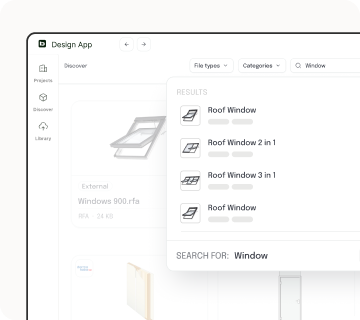
Find and filter Revit families without opening your browser
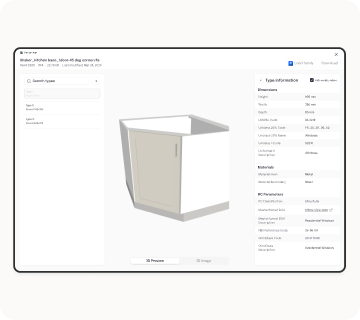
Check geometry, parameters, and values before adding Revit families to your project
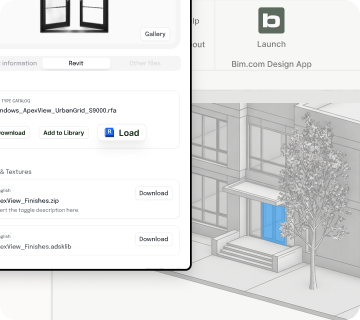
Load Revit families directly into your project without downloading files locally

Design App is a free Revit plugin that helps architects, engineers, and designers search BIM objects, preview product information, and load Revit families directly inside Revit.
You can browse BIM objects and download files without Revit. To search, preview, and load Revit families directly into your project, you need Revit.
The Design App supports the latest four versions of Revit, following Autodesk’s release cycle. Currently supported versions: Revit 2027, 2026, 2025, and 2024. We regularly update compatibility as new versions are released. You can follow the latest updates in our changelog.
Unfortunately Revit LT does not support plugins, so the Design App cannot be connected there.
Yes, the Design App is free to download and use.
No. You can search, preview, and load families directly inside Revit without storing files locally.
Yes. You can inspect geometry and key parameters before adding them to your project.
You can find manufacturer-specific BIM objects and Revit families across multiple categories. You can also access families you've previously saved and uploaded in your Library.
You can reach out to manufacturers and ask them to provide their products on BIMobject, so you can use them in your projects.
The Library helps you save, organize, and reuse Revit families inside Revit. You can keep track of the families you've worked with and quickly access them in future projects.
Your data is handled according to BIMobject’s Privacy Policy. We use it to provide, support, and improve the Design App experience. Your data is deleted when you remove your account.For more details, please see our Privacy Policy.
Keep your Revit workflow focused and uninterrupted.